We have finished our Magazine advert and our Digi-Pak. We ended up make 2 digi-paks, and we had to compare them and see which one our grouped overall liked the best and sold the artist the best and which one had a good relationship with the magazine advert. Overall i think that our magazine ad and digi-pak look really good and they have a good relationship. we used other style digi-paks like Madonna's for an idea on how we should base our ideas and what kind off style to go for. We also had a magazine ad which we could look at the layout and style and then put our own style, colours, pictures and texts in. We made sure that we used the same text, similar pictures and the same colour scheme in both the magazine and the digi-pak. I feel that there is a good strong correlation and relationship between our final music video and our other promotional products (Magazine advert and Digi-pak).
Our Digi-pak and Magazine advert have a good relationship with out final music video because they both have a very similar colour scheme and the images we used are ones we got during the filming so people are going to be able to relate them easily. They also have similar layout on where the artist is on the page and how they look in the picture. The mise-en-scene of them are very much the same because of the green screening we done and the layout and texture of the images, the make-up that we used on David Bowie is the same because we took the picture during filming, all that we have done is to make it stand out more by putting the contrast up and then just making it a little bit brighter. We also wanted to go for a modern and stylist look so we downloaded new brushes on our photoshop and made David Bowie look modern and stylized compared to his older style, but the comparison is very much the same and very clear. In our digi-pak i also tried to make it look as professional as i could by using record labels, bar-codes, screen settings, different settings for the DVD, sponsors, bbfc recommendations and the general style of them.
Overall i feel that the digi-pak and the Magazine advert, show off the artist and make the artist look very modern and professional.


Tuesday, 24 November 2009
photoshop practice


these are some of the different styles of brushes that we use in our digi-pak and magazine advert.
this is just us testing them out and seeing what different looks we can get.
Wednesday, 18 November 2009
analysis of magazine ad and digipak
magazine ad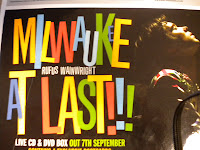

milwaukee at last!!!
by Rufus Wainwright
by Rufus Wainwright
Artist Representation:
- He is on the right of the advert looking up with closed eyes and a spotlight on his face.
- This makes him look more dominant in the picture as he is lit up and has colourful clothes on.
Mise-en-scene
- Artist on the right
- Large colourful text in the centre
- Artist name in the middle of text (smaller than album name)
- everything is either black or hardly lit apart from the main items (aka the album name, and Rufus himself)
- Artists website, Release date, information about product, free items (postcards), record label, stockists
Attract Target Audience?
- Magazine advert seems to try and attract a very wide range of potential audience.
- The font is brightly coloured and large (Could attract a younger audience, 16-20)
- the background is dark and gloomy and on the whole a lot more serious (attract an older audience, 20-40)
- Rufus Wainwright, Folk artist.
Conform to convention? Special content?
- In terms of a folk style genre, this advert does conform to genre.
- The text is similar to that of other folk style adverts, and gives a feeling of folkeyness.
Digipak Analysis
- He is on the right of the advert looking up with closed eyes and a spotlight on his face.
- This makes him look more dominant in the picture as he is lit up and has colourful clothes on.
Mise-en-scene
- Artist on the right
- Large colourful text in the centre
- Artist name in the middle of text (smaller than album name)
- everything is either black or hardly lit apart from the main items (aka the album name, and Rufus himself)
- Artists website, Release date, information about product, free items (postcards), record label, stockists
Attract Target Audience?
- Magazine advert seems to try and attract a very wide range of potential audience.
- The font is brightly coloured and large (Could attract a younger audience, 16-20)
- the background is dark and gloomy and on the whole a lot more serious (attract an older audience, 20-40)
- Rufus Wainwright, Folk artist.
Conform to convention? Special content?
- In terms of a folk style genre, this advert does conform to genre.
- The text is similar to that of other folk style adverts, and gives a feeling of folkeyness.
Digipak Analysis

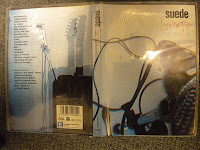
Suede
Lost In T.v.
Lost In T.v.
Artist Representation
- No image of artist on cover, just fuzzy pictures of instruments
- Aimed at maybe a more dedicated fan base who know who the band is, as it doesn't really represent the artist in any promotional way.
- Mysterious because of no images of artist.
Mise-en-scene
- Fuzzy images of instruments, looks like tv screen
- Very simple, bland, just image, band name, and the album name,
- Album name is more interesting than anything else on the cover making the audience get drawn mainly to that.
- Track names on the back, and special features
- Company details, barcode, etc.
Attract Target audience?
- This Digipak seems to be targeted mostly at existing customers rather than new customers.
- Probably audience between 30 - 50
Conform to convention? Special content?
- Convention of rock/indie artist
- Glum, Moody, dark, generally pretty monotone.
- conforms to the moodyness of Indie/Rock Artists
- Special features (New track, commentary, short film)
- No image of artist on cover, just fuzzy pictures of instruments
- Aimed at maybe a more dedicated fan base who know who the band is, as it doesn't really represent the artist in any promotional way.
- Mysterious because of no images of artist.
Mise-en-scene
- Fuzzy images of instruments, looks like tv screen
- Very simple, bland, just image, band name, and the album name,
- Album name is more interesting than anything else on the cover making the audience get drawn mainly to that.
- Track names on the back, and special features
- Company details, barcode, etc.
Attract Target audience?
- This Digipak seems to be targeted mostly at existing customers rather than new customers.
- Probably audience between 30 - 50
Conform to convention? Special content?
- Convention of rock/indie artist
- Glum, Moody, dark, generally pretty monotone.
- conforms to the moodyness of Indie/Rock Artists
- Special features (New track, commentary, short film)
 This is one of our ideas for a magazine cover,
 using custom brushes and abstract colours that
match the genre of our music video, we have made
a fairly professional looking image.
we are currently looking for a suitable font for
information then we will upload a draught of the final
product.
magazine ad and digipak
there are certain aspects of the promotional material that are needed in them, such as:
Function Of A Magazine Advert
-promote the video and the artist
-name of the artist
- album
-reviews from
-celebs
-music press
-newspapers
-name of labels with logos
-where the product is available
-eye catching visuals
-websites
-myspace
-official
DigiPak
-showcase the artist
-menu
-collector items
-limited edition
-special features
-out takes
-video documentary
-making of the video
-interviews
-live performance
-interactive content
-guitar hero
-competitions
-bonus tracks
-exclusive
-uncut version
-short film
-artists work/personal work
these are some of the things that we are going to be thinking about and including in our products.
Function Of A Magazine Advert
-promote the video and the artist
-name of the artist
- album
-reviews from
-celebs
-music press
-newspapers
-name of labels with logos
-where the product is available
-eye catching visuals
-websites
-myspace
-official
DigiPak
-showcase the artist
-menu
-collector items
-limited edition
-special features
-out takes
-video documentary
-making of the video
-interviews
-live performance
-interactive content
-guitar hero
-competitions
-bonus tracks
-exclusive
-uncut version
-short film
-artists work/personal work
these are some of the things that we are going to be thinking about and including in our products.
Wednesday, 11 November 2009
artists
New Artist-
Rick Astley-never gunna give it up
http://www.youtube.com/watch?v=Yu_moia-oVI&feature=related
Madonna-like a virgin
http://www.youtube.com/watch?v=VJ1Q_cZTYGI
Artists-
David Bowie-life on mars
http://www.youtube.com/watch?v=v--IqqusnNQ
Elton John
http://www.youtube.com/watch?v=Y2Ta0qCG8No
Vanilla Ice-ice ice baby
http://www.youtube.com/watch?v=rog8ou-ZepE
The Beatles-at the cavern club and money
http://www.youtube.com/watch?v=90Li7n56uU8
http://www.youtube.com/watch?v=E3m-gOelA8g
Westlife-Flying without wings
editing.
so far me and Ollie have change the vanilla ice section Agni and put a video behind him as he sings of a wall of graffiti. just like in there video. we got the cideo from youtube and then copied it in to out sequence.
we have also put small freeze frames in on the beats before the vanilla ice section to fill the gap and to show the audience the next artiest.
we also changed the fade we had on the artist to a blast of white colour from the artist and then a zoom in to the artist and then the screen goes completely white for about 3sec as you begin to see the slow-motion boyband, walking down the stairs.
we have edited the 'westlife' footage by slowing it down and making it more stylized by making it black and white and putting a blue hue over the top to give it a boyband stylized feel. We put small clips of all the artistes featured, on the beat at the break-down. Then when the singing comes back we show the boyband singing for the last time and then we will have 'Rick Astley' in the court yard singing and small bit of dancing, then it will jump to 'Madonna' dancing and then singing the last bit of the chours, then it will finish with her turning her back to the camera and her walking way or of her slowing fading in to the distance.
The Rick Astley section wont take long to edit all it will need is cutting up in to section of footage and then possibly putting a grainy effect over the top.
The Madonna section will need a little bit more because it will need to be green screened and then cut up and hen put in with the rest of the footage. if anything goes wrong then will need to just put some old footage in instead. it will be a shame.
we have planned it enough to get it all done just in time.
we have the last lesson to finish the rest of the video.
- 40mins filming
- 20mins cutting it up and getting the right bits of the footage
- 30mins eding it together and making it look good.
we have also put small freeze frames in on the beats before the vanilla ice section to fill the gap and to show the audience the next artiest.
we also changed the fade we had on the artist to a blast of white colour from the artist and then a zoom in to the artist and then the screen goes completely white for about 3sec as you begin to see the slow-motion boyband, walking down the stairs.
we have edited the 'westlife' footage by slowing it down and making it more stylized by making it black and white and putting a blue hue over the top to give it a boyband stylized feel. We put small clips of all the artistes featured, on the beat at the break-down. Then when the singing comes back we show the boyband singing for the last time and then we will have 'Rick Astley' in the court yard singing and small bit of dancing, then it will jump to 'Madonna' dancing and then singing the last bit of the chours, then it will finish with her turning her back to the camera and her walking way or of her slowing fading in to the distance.
The Rick Astley section wont take long to edit all it will need is cutting up in to section of footage and then possibly putting a grainy effect over the top.
The Madonna section will need a little bit more because it will need to be green screened and then cut up and hen put in with the rest of the footage. if anything goes wrong then will need to just put some old footage in instead. it will be a shame.
we have planned it enough to get it all done just in time.
we have the last lesson to finish the rest of the video.
- 40mins filming
- 20mins cutting it up and getting the right bits of the footage
- 30mins eding it together and making it look good.
last lesson
We need to film one more act from 3.00 til the end at 3.30.
we've got ideas of -Madonna
-Rick Astley
We will do Rick Astley from 3.00 till 3.17
then Madonna from 3.17 till 3.30
this will be doing 2 chours and 2and a half instrumentals with Rick Astley, and then Madonna doing half and instrumental dancing then singing the last chours.
costumes-
Madonna- Patrick- dress and lots of necklaces and we will mess his hair up in to a poofy style.
Rick Astley- Ryan- plain black top with possibly a cream coat then ill style my hair so its slicked back and possbly with some glasses.
location-
madonna- will be green screened and then a picture of the river behind, but we will also shoot some short dance bits.
Rick Astley- will be outside in the tennis corts, agains a fence. like in the video.
we've got ideas of -Madonna
-Rick Astley
We will do Rick Astley from 3.00 till 3.17
then Madonna from 3.17 till 3.30
this will be doing 2 chours and 2and a half instrumentals with Rick Astley, and then Madonna doing half and instrumental dancing then singing the last chours.
costumes-
Madonna- Patrick- dress and lots of necklaces and we will mess his hair up in to a poofy style.
Rick Astley- Ryan- plain black top with possibly a cream coat then ill style my hair so its slicked back and possbly with some glasses.
location-
madonna- will be green screened and then a picture of the river behind, but we will also shoot some short dance bits.
Rick Astley- will be outside in the tennis corts, agains a fence. like in the video.
editing
We have started the final stage of editing in our last lesson, we moved some footage about and we started editing the new footage we shot in the early part of the lesson.
We have booked our computer after college today so we can finish all of our editing and make sure that we have the last lesson on Friday to polish it and make it the best it can be.
me and Ollie have started the editing in the previous lesson and we know what needs to be done to get it up to scratch.
We have booked our computer after college today so we can finish all of our editing and make sure that we have the last lesson on Friday to polish it and make it the best it can be.
me and Ollie have started the editing in the previous lesson and we know what needs to be done to get it up to scratch.
reshooting
last lesson we re shot our top layer on our 'vanilla ice' section, so it fitted with the lyrics and fitted together smoother. We also re shot the whole of the 'westlife' section because the footage before wasn't very good and it would have looked rubbish. so we planned our footage out this time and made sure that we had the right green screen.
We are planning to have another time to shoot another artist like 'Madonna' because at the moment the footage finishes at 2.20 and the track finishes at 3.30 and 'Westlife' would become abit boring and repetitive, and it wont fit the the speed of our track and editing so far.
We are planning to have another time to shoot another artist like 'Madonna' because at the moment the footage finishes at 2.20 and the track finishes at 3.30 and 'Westlife' would become abit boring and repetitive, and it wont fit the the speed of our track and editing so far.
Wednesday, 4 November 2009
Peer Feedback Group 03
Artist representation - close ups and star image
The video has a great use of artist representation as it shows the separate members of the group doing legendary artist impersonations, featuring many close ups with good costumes and lighting effects.
In Evaluation, parts of the video are missing, which takes away a certain feel that is brought by previous footage. However the shots you do have fit the song, and follow your pitch ideas greatly, which makes what footage you do have work very well.
The video has a great use of artist representation as it shows the separate members of the group doing legendary artist impersonations, featuring many close ups with good costumes and lighting effects.
In Evaluation, parts of the video are missing, which takes away a certain feel that is brought by previous footage. However the shots you do have fit the song, and follow your pitch ideas greatly, which makes what footage you do have work very well.
Lyrics and visuals feedback
Some good lip syncing.
Patrick's bit was impressive and caught the mood of the lyrics well.
quite hard to work with the lyrics as it doesn't have many.
overall well done with the lyrics.
It will be really good once you've finished the editing and have all the different bits cutting between each other and filling out the whole song.
Patrick's bit was impressive and caught the mood of the lyrics well.
quite hard to work with the lyrics as it doesn't have many.
overall well done with the lyrics.
It will be really good once you've finished the editing and have all the different bits cutting between each other and filling out the whole song.
Feedback from group 5
good use of green screen at beginning and also taking advantage of make up used in the editing process to blend the eyes and hair giving a mystical effect.
Also the slow fade in at 37 sec look very professional.
the piano scene works well to provide mild humor and also it is very similar to madness videos in the way that the piano is obviously not being played properly but the audience dont really notice this due to the comical factor.
the music and visuale link well by including performances throught out the video, for example a drummer drumming to the beat of the music.
obviously the video has not yet been finished and the group could include more graphical effect, maybe in the form of words on screen
Also the slow fade in at 37 sec look very professional.
the piano scene works well to provide mild humor and also it is very similar to madness videos in the way that the piano is obviously not being played properly but the audience dont really notice this due to the comical factor.
the music and visuale link well by including performances throught out the video, for example a drummer drumming to the beat of the music.
obviously the video has not yet been finished and the group could include more graphical effect, maybe in the form of words on screen
Rough Cut- Peer Feedback
I think if the group are going for a cheesy techno 80s feel video, they are doing pretty well. The use of special effects and filters works well and fits the music. There are quite a few gaps but what's there is strong. There is no strong narrative to the video but I don't think there is supposed to be. The performance aspects may drag on too much.
re-shooting
our rough-cut deadline has been meet and we have some blank spaces where we were going to put different sections of footage, but some bits of footage weren't long enough and some bits really didn't look good. But we had already decided that we going to re shoot some bits of footage, like the westlife section because we didn't really have enough planning time (after being told that we have no time in the music room).
Plan: i think that we should us the dolly and pan round a the group and get close-up shots of us in the camera, this is conversations in some westlife videos. also we will shoot a long shoot of us as a group and a moody shoot of us. They will all be conventional shoots from different styles of boyband videos.
costumes: They will be very similar to last time, just smart shirts and jackets and shoes. But i think that we should so one shot with us more casual, and more like a group of Friend in a boyband. also in videos if convention.
location: i think that we should shoot it in the same location as last time, up of the stage and in the main hall, you get allot of natural light and we can mix it with artificial lighting, to make it look brighter.
booking: we will need to book a time to use a camera, lights, tripod and dolly.
This will fill the spare time that we have in the middle for the boyband section that we already have.
Plan: i think that we should us the dolly and pan round a the group and get close-up shots of us in the camera, this is conversations in some westlife videos. also we will shoot a long shoot of us as a group and a moody shoot of us. They will all be conventional shoots from different styles of boyband videos.
costumes: They will be very similar to last time, just smart shirts and jackets and shoes. But i think that we should so one shot with us more casual, and more like a group of Friend in a boyband. also in videos if convention.
location: i think that we should shoot it in the same location as last time, up of the stage and in the main hall, you get allot of natural light and we can mix it with artificial lighting, to make it look brighter.
booking: we will need to book a time to use a camera, lights, tripod and dolly.
This will fill the spare time that we have in the middle for the boyband section that we already have.
Tuesday, 3 November 2009
Rough Cut Feedback TAW
Some of you footage is very impressive. It is well styled and lit and the artists you are referencing are clear. You need to finish a basic edit to show how the shape of the video is going to emerge. You should continue to work in the detailed way in order to get the best out of each set up. Well done.
last lesson
due to the Friday before half term being off and our last lesson was then! we have been given an extra day of editing. this lesson we are putting all of our footage together and putting all the green screens on and make sure they all go together well.
ten when we have been given out feedback we will put all the full effects on and just tweak it to make it perfect and if we need to (which we do) we will have a bit of time to re shoot some section or bits of footage.
editing is going well so far all the footage is going together well and it all fit and looks really good and effective, very eye catching to a audience.
ten when we have been given out feedback we will put all the full effects on and just tweak it to make it perfect and if we need to (which we do) we will have a bit of time to re shoot some section or bits of footage.
editing is going well so far all the footage is going together well and it all fit and looks really good and effective, very eye catching to a audience.
Monday, 2 November 2009
so far...
So far we have filmed everything and made a good start in the editing. We still have a bit to do on it, but mainly just getting the green screen perfect and the shots slotted together. we have been lucky enough to be given one more day of editing because we miss a day due to the friday being a holiday.
We did have some trouble with filming because we booked the music room for lunch and a small section of the next lesson on the monday, BUT when we got there cut it down to abit of lunch, so we couldn't get all of our 'Beatles' footage, so we decided to add in a small boyband section to also have more contract with the other footage and to also replace the other half of the 'beatles' section. The boyband we decided to do was 'Westlife' because there are a big, well known band that fit to the stereotipical boyband image.
Because we were filming our 'Beatles section on the last day of filming, and we couldn't finish it all, we had to pretty much make a rough plan of our 'Westlife' footage and the go by it because we only had limited time left. The footage came out good enough so we known that we need to reshoot it, but we know what we need to shoot.
The current order for our footage is:
-David Bowie -footage really good and all the editing is done. The green screen is really good with these section because it looks all retro and slightly old and this looks just like the Bowie section of 'life on mars' that we aiming to achieve.
-The Beatles -A small section of close up to medium shots of the drummer to fit to the beat. looks really good and the editing is finished on that, it was green screened as well but it doesn't look as good as the Bowie footage. But i think that we should put an image behind instead to make it more apealing and more bolder, we can make it fit to the retro 60's age of the 'Beatles' instead of a plain edited background. The costumes were just smart suits and we gelled our hair if we had hair that was to long to make them look like bowls.
-Elton John -The footage looks really good and quite cheesy and funny, but not intentional. we haven't green screened it but we have done many different shots, long, medium, close up of face, close up of feet, close up of keys. Just so we can get the right but of footage. So far we have only used a medium shot at the beginning and a close-up at the end because we wanted to make it it like the 'crocodile rock' video. We have put some colour hue and saturation filters over it and other editing techniques on it to make it look colourful but still keeping to the conventions on the video. The costume was smart suit and some pink heart shaped glasses and i styled my hair to make it look like his. The footage also looks effective in the way that the ginger hair is really eye catching.
-Vanilla Ice -the footage is good, but it could be better. But it looks really effective because the background is of the stage and we have lots of different props on the stage to make it look like an abanded warehouse, and we have put no natural lighting on it it all artificial and its been put only in sections, so it like light is just seeping in, it looks really effective. we also put a dance to this and there are bits that look really good and bits that don't... we have finished all the editing on this but we have the last lesson to finish this section for the rough-cut deadline. The costumes were just trackies and baggie top, a retro hip-hop look.
-Westlife -This was done on the spot because of the music department. We know what we have have to shoot, we just need to re-shoot it because the footage looks pretty bad, but on a whole it looks really effective. We all had our costumes because we had it from the 'Beatles'. When we re shoot it and finished with a slow motion editing it will look really good but for the rough-cut it will look average.
So far the editing has gone together really well and it all seems to fit. We have green screen quite a lot of our footage so it takes that little bit longer to edit because we need to get the right quantities green edited out without cutting any of the artist. The timing is good so far we just need to put it all together for the rough cut and see what we need to do to make it better or to add on more of a certain section.
Personal at the moment i am really pleased with the footage and i am really looking forward to getting it all together and finalized. It should really good and it bit quite funny but not intentional. All we need to do now is to finish all the editing on 'Vanilla Ice' and 'Westlife'.
We did have some trouble with filming because we booked the music room for lunch and a small section of the next lesson on the monday, BUT when we got there cut it down to abit of lunch, so we couldn't get all of our 'Beatles' footage, so we decided to add in a small boyband section to also have more contract with the other footage and to also replace the other half of the 'beatles' section. The boyband we decided to do was 'Westlife' because there are a big, well known band that fit to the stereotipical boyband image.
Because we were filming our 'Beatles section on the last day of filming, and we couldn't finish it all, we had to pretty much make a rough plan of our 'Westlife' footage and the go by it because we only had limited time left. The footage came out good enough so we known that we need to reshoot it, but we know what we need to shoot.
The current order for our footage is:
-David Bowie -footage really good and all the editing is done. The green screen is really good with these section because it looks all retro and slightly old and this looks just like the Bowie section of 'life on mars' that we aiming to achieve.
-The Beatles -A small section of close up to medium shots of the drummer to fit to the beat. looks really good and the editing is finished on that, it was green screened as well but it doesn't look as good as the Bowie footage. But i think that we should put an image behind instead to make it more apealing and more bolder, we can make it fit to the retro 60's age of the 'Beatles' instead of a plain edited background. The costumes were just smart suits and we gelled our hair if we had hair that was to long to make them look like bowls.
-Elton John -The footage looks really good and quite cheesy and funny, but not intentional. we haven't green screened it but we have done many different shots, long, medium, close up of face, close up of feet, close up of keys. Just so we can get the right but of footage. So far we have only used a medium shot at the beginning and a close-up at the end because we wanted to make it it like the 'crocodile rock' video. We have put some colour hue and saturation filters over it and other editing techniques on it to make it look colourful but still keeping to the conventions on the video. The costume was smart suit and some pink heart shaped glasses and i styled my hair to make it look like his. The footage also looks effective in the way that the ginger hair is really eye catching.
-Vanilla Ice -the footage is good, but it could be better. But it looks really effective because the background is of the stage and we have lots of different props on the stage to make it look like an abanded warehouse, and we have put no natural lighting on it it all artificial and its been put only in sections, so it like light is just seeping in, it looks really effective. we also put a dance to this and there are bits that look really good and bits that don't... we have finished all the editing on this but we have the last lesson to finish this section for the rough-cut deadline. The costumes were just trackies and baggie top, a retro hip-hop look.
-Westlife -This was done on the spot because of the music department. We know what we have have to shoot, we just need to re-shoot it because the footage looks pretty bad, but on a whole it looks really effective. We all had our costumes because we had it from the 'Beatles'. When we re shoot it and finished with a slow motion editing it will look really good but for the rough-cut it will look average.
So far the editing has gone together really well and it all seems to fit. We have green screen quite a lot of our footage so it takes that little bit longer to edit because we need to get the right quantities green edited out without cutting any of the artist. The timing is good so far we just need to put it all together for the rough cut and see what we need to do to make it better or to add on more of a certain section.
Personal at the moment i am really pleased with the footage and i am really looking forward to getting it all together and finalized. It should really good and it bit quite funny but not intentional. All we need to do now is to finish all the editing on 'Vanilla Ice' and 'Westlife'.
Tuesday, 20 October 2009
General Update
Today we are uploading the remaining footage, yesterday we filmed the elton john section & vanilla ice dance performance; we added westlife into the mix as we thought we lacked the boyband image, and cut down the beatles section due to location difficulties, so ollie will be playing ringo starr on drums instead. While Ollie and Ryan upload and edit, i will be working on the DVD cover. Ive been experimenting with custom made photoshop brushes, quite a few from http://abduzeedo.com/11-great-abstract-photoshop-brushes-light-effects. Templates and mood boards will be uploaded shortly!
Friday, 16 October 2009
thinking ahead!
This is Patrick as Bowie, i've used photoshop to add a opaque broken glass effect frame, with blue contrasting cracks coming from outside of the image. These sort of effects are affective for stills, but can be used in video aswell. Our upcoming designs for the dvd cover and magazine advert could definitely use these tools.

planning and booking
we went to the music room and booked a time when we can use the drums, guitars and piano so we can film our Beatles section and our Elton John section. We will also shoot our other pieces on the Monday but outside the booked time. Then we will spend the rest of the week editing so we can meet the rough-cut deadline on the 23rd Oct (end of lesson). Then if we need to we will re shoot any footage that we feel needs doing or changing.
Wednesday, 14 October 2009


this our some images of us at work on the final David Bowie shoot and us at work.
green screening
we shot our final David Bowie shot with make-up and full costume. we learned how to edit green screen by going on to youtube and searching for a tutorial because we wanted to extend out knowledge of the software.. we got our footage and the youtube video and simultaneously edited it till we got it how we wanted it.
this is the video we found on youtube.
this is the video we found on youtube.
Tuesday, 13 October 2009
The Beatles section
from 0.43sec we are cutting to The Beatles section.
costumes:- suits (black).
-bowl hair cut (flickie) and make-up
set:- green screen, then edit a retro black and white floor.
- lots of artifical lighting.
-fan.
-camera.
props:- *2 guitars.
- drum kit.
- mic.
http://www.youtube.com/watch?v=HzIeVyBKbsE
this is the look and feel that we want to achieve at the end of The Beatles section.
costumes:- suits (black).
-bowl hair cut (flickie) and make-up
set:- green screen, then edit a retro black and white floor.
- lots of artifical lighting.
-fan.
-camera.
props:- *2 guitars.
- drum kit.
- mic.
http://www.youtube.com/watch?v=HzIeVyBKbsE
this is the look and feel that we want to achieve at the end of The Beatles section.
at work! on David Bowie.


we decided that we are using the radio edit track which us only 3.30 so we can get better quality shots!
we've shot the David Bowie beginning up to 0.43sec. Then it will go to The Beatles for the bridge.
we shot this with a giant green screen and lots of artificial lighting to bring out the whiteness in his face and a big bold blue eye shadow, we also had a fan to make his hair go a little bit more wild.
we will edit it so it highly saturates him out so it gets the David Bowie effect and feel.


Plan
The aim of the video will be to visual document the history and changes within popular music culture, this is designed to be a homage to particularly influential artists over the last century.
Due to the historical context of the video it it inevitably appear humorous to the audience.
This will be a performance video, it will be linear, we will start with the earliest act and then end with the more recent acts.
The band will dress up as famous and well known artists, and bands through the 20th century. The the band will cover acts such as: Run DMC, David Bowie, Queen, Kiss, Elvis, The Beatles, Eminem, Elton John, Micheal Jackson, Ozzy Osbourne and Madonna.
more info at at later post...
Due to the historical context of the video it it inevitably appear humorous to the audience.
This will be a performance video, it will be linear, we will start with the earliest act and then end with the more recent acts.
The band will dress up as famous and well known artists, and bands through the 20th century. The the band will cover acts such as: Run DMC, David Bowie, Queen, Kiss, Elvis, The Beatles, Eminem, Elton John, Micheal Jackson, Ozzy Osbourne and Madonna.
more info at at later post...
Tuesday, 6 October 2009
Artist Ideas
-RUN DMC-
-DAVID BOWIE-
-QUEEN-
-KISS-
-ELVIS-
-THE BEATLES-
-EMINEM-
-ELTON JOHN-
-M.J.-
OZZY OSBOURNE-
-DAVID BOWIE-
-QUEEN-
-KISS-
-ELVIS-
-THE BEATLES-
-EMINEM-
-ELTON JOHN-
-M.J.-
OZZY OSBOURNE-
Friday, 2 October 2009
PropsTing
Because of the 'retro feel' that the song portrays, we could use lots of retro items in our music video.
For example:
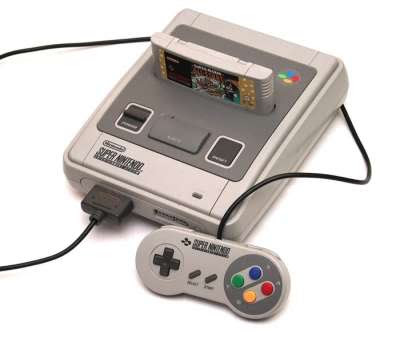
This is a Super Nintendo. Made famous in the 80s. Has a retro feel.
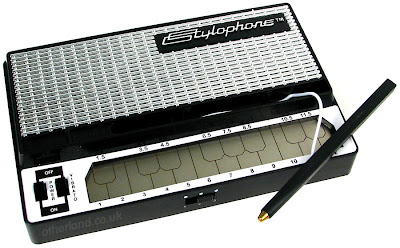
This is a stylophone that makes monophonic sounds. which, aswell as being retro, also matches some of the synth sounds that can be heard in 'Sister Siam'
For example:

This is a Super Nintendo. Made famous in the 80s. Has a retro feel.

This is a stylophone that makes monophonic sounds. which, aswell as being retro, also matches some of the synth sounds that can be heard in 'Sister Siam'
http://www.youtube.com/watch?v=Joi-YYffvtk
This video shows the various effects of blue screen, at a very basic level. Although its basic it can be used effectively to make a few abstract and surreal shots, like flames in the background, flying in the air, running on water, swimming and playing underwater, could all be done fairly easily using the right software.
Here is a tutorial on how to produce good quality blue screen products in terms of lightings:
http://www.youtube.com/watch?v=4RZnF_BhnOs
This video shows the various effects of blue screen, at a very basic level. Although its basic it can be used effectively to make a few abstract and surreal shots, like flames in the background, flying in the air, running on water, swimming and playing underwater, could all be done fairly easily using the right software.
Here is a tutorial on how to produce good quality blue screen products in terms of lightings:
http://www.youtube.com/watch?v=4RZnF_BhnOs
Our song:
Artist - The Whip
Song - Sister Siam
______________________
Although it is a modern song, it keeps a retro feel; the electro balanced beat reminds us of a early dance song with an almost tacky 4 beat phrase, but never the less it works very well in a indie/electro/young pop. We were thinking about using a timeline going from the 50's to the future using plenty of inter textual references. Thats just an idea in the process of discussion
Artist - The Whip
Song - Sister Siam
______________________
Although it is a modern song, it keeps a retro feel; the electro balanced beat reminds us of a early dance song with an almost tacky 4 beat phrase, but never the less it works very well in a indie/electro/young pop. We were thinking about using a timeline going from the 50's to the future using plenty of inter textual references. Thats just an idea in the process of discussion
costumes

These spandex jumpsuits would make ideal costumes for our music video, maybe for the performance side - if there is one - or even to just roam around in; either way the colours are relevant and stylistic to our genre and would be original aswell.
Wednesday, 30 September 2009
mooadboard

this is a moodboard of the kind of image and feel we want to achieve fro our media video. we want the big bold colors and the little parts of animation. we are also thinking of having a 70's hippy feel to it with all the bold bright colors.
Visual Style Influence
This is a song by Robbie Williams, The way the video is edited influenced us, for example during the video the video cuts to the beat a lot, also visual effects such as shots within shots are used, and again they are added in with the beat.
Ideas. MUSIC AND VISUALS
Another idea using music and visuals could be using shapes and colours. As our track sounds like a track made in the 70's/80's due to the synths and basslines, we thought we could add effects to the music that contrast with the music for example colours and shapes...

 We could use Coloured shapes like this in the
video that would appear with the music like
When the beat changed etc
We could use Coloured shapes like this in thevideo that would appear with the music like
When the beat changed etc
Teacher Feedback on Blog
Your blog has some good content on it. When we spoke about your blog you mentioned that it doesn't have a lot of detail on it regarding your ideas - you're right. If you can write a full shot list for the video and type it up onto the blog then this will help to fill in the current gap regarding the communication of your idea.
You also need something to communicate your mise-en-scene, i.e. props, costumes lists (with visuals) and a mood board. You also need details on your locations - where are they, what do they look like etc.
Fill your blog with influences, i.e. videos and images that correspond to your ideas.
Sketch out your ideas for your digipak and your magazine ads - use either photoshop or do it with pen and paper and then take a photo and upload it.
Your ideas are visually striking - your blog needs to communicate those ideas a bit more effectively and visually.
Good work - keep it going.
You also need something to communicate your mise-en-scene, i.e. props, costumes lists (with visuals) and a mood board. You also need details on your locations - where are they, what do they look like etc.
Fill your blog with influences, i.e. videos and images that correspond to your ideas.
Sketch out your ideas for your digipak and your magazine ads - use either photoshop or do it with pen and paper and then take a photo and upload it.
Your ideas are visually striking - your blog needs to communicate those ideas a bit more effectively and visually.
Good work - keep it going.
contact.

we have sent a message to 'the whips' official myspace about what we are doing and we are currently waiting for a reply.
myspace
http://www.myspace.com/thewhipmanchester
this is there official myspace website. when we have to make contact to the we will use there myspace and see if they want any input.
we can also look at there target audience and the other type of music they do and work out the style of magazine cover and dvd pack, also the style of music video if we want to keep it to conventions.
Song Structure + MORE IDEAS.
0:00 - 0:03 - Pre Intro (Audio effects added to a voice)
0:03 - 0:32 - Intro/Instrumental
0:32 - 1:03 - Verse 1
1:03 - 1:10 - Pre chorus/Verse/Instrumental
1:10 - 1:24 - Instrumental
1:24 - 1:53 - Verse 2
1:53 - 2:00 - Pre chorus/Verse/Instrumental
2:00 - 2:30 Verse3/Chorus
2:30 - 3:30 - Breakdown
3:30 - 3:58 - Instrumental
3:58 - 4:58 - Outro - with reverberated vocals from the verse.
This structure gives us a good idea of how to set up our video, and and what times the music changes beat, Rhythm and timing.
Throughout the song, Instruments are removed and added depending on how the artist wanted to make to audience feel. We will use this technique to our advantage and add visual references to the music video whenever different instruments are added. For example; from 2:30 - 3:30 the song goes into a breakdown where most off the instruments are removed and it is just left with the basics: drums, bass and maybe a lead synth. Gradually as the song progresses through the Breakdown, other instruments are added such as heavy basslines and more drums to build up the tension in the track and make the listener anticipate what is coming next.
> We will use this anticipation that the track creates and add visual representations to go with it.
For example, We could change the length of the shots, starting from long shots gradually getting faster and faster untill the track drops and heads off into the verse.
Another idea could be to use the adding of instruments and the visuals together. for example, when an instrument is added so is another bit of scenery in the video etc etc...
0:03 - 0:32 - Intro/Instrumental
0:32 - 1:03 - Verse 1
1:03 - 1:10 - Pre chorus/Verse/Instrumental
1:10 - 1:24 - Instrumental
1:24 - 1:53 - Verse 2
1:53 - 2:00 - Pre chorus/Verse/Instrumental
2:00 - 2:30 Verse3/Chorus
2:30 - 3:30 - Breakdown
3:30 - 3:58 - Instrumental
3:58 - 4:58 - Outro - with reverberated vocals from the verse.
This structure gives us a good idea of how to set up our video, and and what times the music changes beat, Rhythm and timing.
Throughout the song, Instruments are removed and added depending on how the artist wanted to make to audience feel. We will use this technique to our advantage and add visual references to the music video whenever different instruments are added. For example; from 2:30 - 3:30 the song goes into a breakdown where most off the instruments are removed and it is just left with the basics: drums, bass and maybe a lead synth. Gradually as the song progresses through the Breakdown, other instruments are added such as heavy basslines and more drums to build up the tension in the track and make the listener anticipate what is coming next.
> We will use this anticipation that the track creates and add visual representations to go with it.
For example, We could change the length of the shots, starting from long shots gradually getting faster and faster untill the track drops and heads off into the verse.
Another idea could be to use the adding of instruments and the visuals together. for example, when an instrument is added so is another bit of scenery in the video etc etc...
Friday, 25 September 2009
ideas and thoughts
this is the original music video for the sister siam and we really like it so we will play on the idea of the space journey and make it even more visually exiting and abstract than it is now.
we looked at some of there other videos and we really like the effect on this video so we will shoot some footage in the green room and then edit it so it really abstract like the blackout video.
we really like the black background and the heavy bright colors coming through and also the multiple shots. its a heavy edit job so we will have to get all or most of our filming done early so we can play with the editing so we can make it look good and fit to the beat. we will have to make sure that we don't get to tired down wit it all then get to the end and have to re-shoot, so we will keep it all flowing.
i would also like this effect of the black and heavy multiple color as a dvd cover it looks very appealing.
change of song!!
after going through are ideas together we decided that the filaments song and are ideas together would look really bad and it wouldn't work. so we went back to our initial idea of 'The Whip-Sister Siam".
we will soon post our pitch mood board and ideas.
we will soon post our pitch mood board and ideas.
Wednesday, 23 September 2009
auteur research
P1- Auteur Presentation - Michel Gondry
View more presentations from Media Studies.
this is some research in to Michel Gondry that we did to get ideas of different styles of music videos and visuals.
links
this is the link to the official myspace...
http://www.myspace.com/thefilaments
this has some of the other songs that they make and different pictures of them at gigs and of the band. this will give us some ideas as to how we will present the band through the music video and DVD package.
http://www.myspace.com/thefilaments
this has some of the other songs that they make and different pictures of them at gigs and of the band. this will give us some ideas as to how we will present the band through the music video and DVD package.
lyrics
these are the lyrics for "The Filaments-B.P.C"
Lyrics to B.P.C. :
Benfleet punx crew is the name of the firm so dear to me.
You'll see them on the cider
and keeping it real out on the street.
We like to drink with them and sing with them
thats how its always been.
We spent our teenage years like a punk rock family.
Through all the party nights and pissed up fights,
a lot of shit went down
But we always stand together, we're unified and proud.
Back to those early gigs we were kids,
but we knew how it had to be
The beenfleet punx and chelmsford crew in solidarity
Hey!
Hey!
Hey!
The B.P.C.!(x3)
Hey!
Hey!
Hey!
Done down on southend seafront, a DIY gig.
The BPC gathers and they're busting out the drink
there gonna have a beer and have a laugh
thats what its all about.
And then it's back to Benfleet
the hometown have no doubt.
Hanging out on street corners
where its punx against the pricks.
nothing can confront us when musics in the mix
Nothing could be better than when I'm drinking with my friends.
BPC this one's for you united to the end.
Hey!
Hey!
Hey!
The B.P.C.!(x3)
Hey!
Hey!
Hey!
Hey!
Hey!
Hey!
The B.P.C.!(x3)
Hey!
Hey!
Hey!
Lyrics to B.P.C. :
Benfleet punx crew is the name of the firm so dear to me.
You'll see them on the cider
and keeping it real out on the street.
We like to drink with them and sing with them
thats how its always been.
We spent our teenage years like a punk rock family.
Through all the party nights and pissed up fights,
a lot of shit went down
But we always stand together, we're unified and proud.
Back to those early gigs we were kids,
but we knew how it had to be
The beenfleet punx and chelmsford crew in solidarity
Hey!
Hey!
Hey!
The B.P.C.!(x3)
Hey!
Hey!
Hey!
Done down on southend seafront, a DIY gig.
The BPC gathers and they're busting out the drink
there gonna have a beer and have a laugh
thats what its all about.
And then it's back to Benfleet
the hometown have no doubt.
Hanging out on street corners
where its punx against the pricks.
nothing can confront us when musics in the mix
Nothing could be better than when I'm drinking with my friends.
BPC this one's for you united to the end.
Hey!
Hey!
Hey!
The B.P.C.!(x3)
Hey!
Hey!
Hey!
Hey!
Hey!
Hey!
The B.P.C.!(x3)
Hey!
Hey!
Hey!
Magazine ad's.
We were given a magazine advert for bands and artist advertising their Albums and Music video DVD's. We drew these out and labelled them as needed. For example: The use of the Band logo and name, How the band is represented through colour, where the product is for sale, how the background is designed and how the magazine ad draws attention.
These were our final Sketches and notes...


intro.
After analyzing all the different song that we had to choose from we came to the conclusion that "The Filaments-B.P.C" was the best song to create a music video for because we all instantly had many ideas that we could use in the making of the video.
Ideas at a later post...
Ideas at a later post...
deadlines and cameras
Deadlines
- Music Video Shooting Deadline: Monday 19th October 9am
- Music Video Rough Cut Deadline: Last lesson of week ending 23rd October
- Music Video Final Deadline: Last lesson of week ending 13th November
- Ancillary Products Deadline: Last lesson of week ending 27th November
- Evaluative Writing Interim Deadline: 9am to Moodle Monday 7th December
- Evaluative Writing Final Deadline: 9am to Moodle Monday 14th December
- Before the rough cut deadline, you will be able to take a camera for 2 overnights or 1 weekend. The first opportunity you will have for filming is Friday 2nd October from 4.10pm.
- Between the rough cut and the Final deadline, you will be able to have a camera in the lessons and for 1 overnight. No weekends.
- You can have a stills camera in the lessons and for 1 overnight, from the point where filming commences. It is possible to have your video and stills cameras at the same time. This actually might be advisable.